FRAME 03 - SEARCH · LIGHTROOM CLASSIC PLUGIN
Find any photo.
By describing it.
A Lightroom Classic plugin that finds any photo in your catalog by typing what's in it. Index once - search in seconds, forever.
Works with Lightroom Classic 6 and later. Requires macOS on Apple Silicon (M1 or later). Intel Mac and Windows support coming based on demand. Request it →













SAVED AS KEYWORD + COLLECTION
TYPE WHAT YOU REMEMBER - THE WALL RE-RANKS AS YOU TYPELIVE DEMO
SEE IT IN ACTION - THE REAL PLUGIN
Type what's in it.
Watch it surface.
CLICK TO PLAY - WITH SOUND, CAPTIONS ON SCREEN
Read the transcript
The video is narrated, and the narration is also captioned on screen. This is the full spoken text:
- Somewhere in your catalog is the shot you need.
- But Lightroom only finds what you tagged - nobody tags everything.
- Smart Search reads your photos. Just describe what you're looking for.
- First, index your photos once. Smart Search looks at each one and remembers what's in it - fast, and resumable.
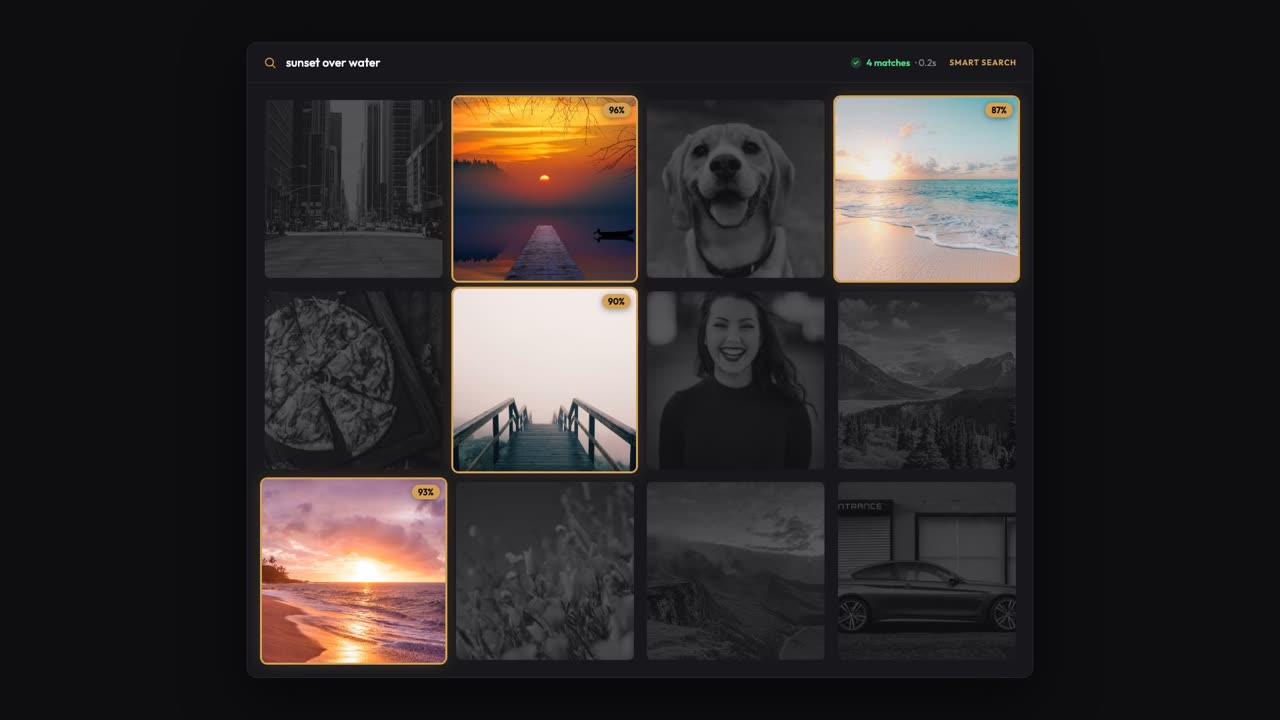
- Then just type what you want. Plain English - 'sunset over water' - and set how strict to be.
- In seconds, the matches surface - even photos you never tagged, never named, and forgot you had.
- Every match becomes a real Lightroom keyword and collection - so it works everywhere your tags already do.
- It all runs on your Mac. No uploads, no account, works offline.
- Working inside one big shoot? Search just the photos you've selected, and find the one.
- Type it, find it. Private by design. One-time purchase - no subscription.
- Stop scrolling. Start describing. Get Smart Search for Lightroom Classic.
FEATURES - WHAT DEVELOPS
Built for photographers with too many photos
and no time to tag them.
Type the photo. Get the photo.
Plain-English search reads what is actually in your photos. "Snow on a tree", "two kids in a fountain", "close-up of a wedding ring" - it finds them. No manual tagging.
Search within your current selection.
Working in a folder or collection? Filter the search to just the selected photos. Find "the candid one" inside the wedding set in seconds.
Results become keywords and collections.
Every search applies a real Lightroom keyword and builds a results collection. Smart Collections, filters, and exports all pick them up - just like any other tag.
Your photos stay on your Mac.
The AI model runs entirely on your machine. No photos uploaded, no servers, no accounts. Works with your internet off.
What you shot is what it reads.
Reads .ARW, .CR2, .NEF, .RAF, .DNG and other camera RAW files directly. No need to export to JPEG first.
One-time price. Move it between Macs.
$39 once. No subscriptions, no usage limits. Deactivate on one Mac to free a license slot, then activate on the new one.
UNDER THE SAFELIGHT - WHY IT'S DIFFERENT
Lightroom Classic only finds what you've tagged. Smart Search finds what's actually there.
Classic's library search reads what you wrote - filenames, keywords, captions. If you never tagged the snowboarding photos as "snowboarding", they don't exist to search. And nobody tags 50,000 photos by hand.
Smart Search reads the pixels. Index your catalog once, then describe what you want and the plugin finds it - "rooftop at golden hour", "kid blowing out candles", "wide shot of the mountains". The matches land as real Lightroom keywords and a results collection, so they work everywhere your existing keywords already work.
HOW IT WORKS - THREE STEPS
Three steps to
a searchable catalog.
Index once. Search forever.
Index
Select photos (or your whole catalog), run Index Selected Photos. The plugin reads each photo locally and remembers what's in it. Resumable - large catalogs run in the background.
Search
Run Search by Description. Type what you're looking for in plain English. Tune how strict the match should be. Optionally restrict to your current selection.
Browse
Matches show up as a Lightroom keyword and a results collection so you can browse them, refine, export, or feed them into a Smart Collection.
CONTACT SHEET - WHAT YOU CAN SEARCH FOR
Plain English in.
Photos out.
sunset over water with people
close-up of a wedding ring
wide landscape with mountains and a road
CONTACT PRINTS - WHAT PEOPLE SAY
The search Lightroom Classic
never shipped.
Found an untagged shot from three years ago just by searching 'red kayak'. I gave up on keywording my 80k+ catalog ages ago, so this thing is pure magic. Huge timesaver.
Being able to just type 'bride laughing near window' and actually find the photo in seconds is insane. It honestly saved me an entire afternoon on my last wedding delivery.
Love that this works fully offline on my Mac. I type 'storm clouds' and boom, it finds them without me ever adding a single keyword. Best plugin I've bought.
FAQ - BEFORE YOU INSTALL
Frequently asked
questions.
What to expect before you install.
How is this different from Lightroom's built-in search?
Lightroom Classic's search reads what you've written - filenames, captions, keywords. If a photo was never tagged "snowboarding", Lightroom won't find it that way. Smart Search reads the pixels, so you can find photos by what's actually in them - even if you've never tagged that catalog at all.
Does it really run fully offline?
Yes - after a one-time model download at first run (~350 MB, 1-3 minutes). After that, no part of the plugin needs the internet. Your photos and search history never leave your machine.
Which Macs and operating systems are supported?
For v1, the shipping installer runs on macOS with Apple Silicon (M1, M2, M3, M4) only. Intel Macs are not supported yet - the installer is arm64-only for now.
Windows and Intel Mac support is on the roadmap if there's enough demand. Tell us if you need Intel Mac or Windows - demand drives priority.
How long does indexing take?
About 1-2 seconds per photo on Apple Silicon. A 10,000-photo catalog typically indexes in 20-40 minutes. You can index in batches and search across whatever you've indexed so far - it doesn't have to finish in one sitting.
How much disk space does it use?
About 350 MB for the AI model. Index data is small - roughly 2 KB per photo, stored in a database file next to the plugin folder.
Does it support RAW files?
Yes. The plugin reads .ARW (Sony), .CR2/.CR3 (Canon), .NEF (Nikon), .RAF (Fuji), .DNG, and other common RAW formats directly. No need to export to JPEG first.
How many machines can I activate on?
Your license key activates on a limited number of computers at a time. If you switch machines, use Library > Plug-in Extras > Deactivate License on the old one to free a slot, then activate on the new one.
What kinds of queries work best?
Concrete, descriptive phrases work best - "snow-covered mountain at sunrise", "two kids playing in a fountain", "macro shot of a flower". Conceptual searches like "joy" or "freedom" sometimes work but are inherently fuzzier. Tune the strictness slider in the search dialog if you're getting too many (or too few) matches.
Will it touch my photos or my edits?
No. Nothing about your photos changes - not your edits, not your ratings, not your originals, not your catalog files. The plugin only reads pixels and writes back to your catalog as standard Lightroom keywords. You can remove every keyword Smart Search added at any time.
Can I get a refund?
Yes - 30-day money-back guarantee, no questions asked. If it is not right for you for any reason, email us within 30 days of purchase and we will refund you in full. We would rather you be happy than keep a sale. Full terms on the Terms of Service page.
What if I have questions or problems?
Reach out via the contact form. Solo developer, personal responses.
Still have a question? Email [email protected] or use the contact form - a real person reads every message and replies, usually within a day. Ask before you buy; we would rather answer than have you guess.
FROM THE JOURNAL
Deep dives for
Lightroom photographers.
THE PRINT - READY WHEN YOU ARE
Stop scrolling through 50,000 photos
for "the one with the boat".
Index once. Search by description in seconds. Forever.
- One-time $39, unlimited indexing - no monthly fee, unlike most AI photo-search tools
- 30-day money-back guarantee - no questions asked
- Your photos never leave your computer
MACOS ON APPLE SILICON (M1 OR LATER)