
FRAME 01 - PUBLISH · LIGHTROOM CLASSIC PLUGIN
Your edits, in your Google Photos album. Always.
A Lightroom Classic plugin that publishes your Collections to Google Photos albums. Edit a photo, hit re-publish, the album updates. A 600-photo gallery goes up in one click - 20-40 minutes the first time, seconds for the handful you re-edit afterwards.
$19 UNTIL OCT 31 - $39 FROM NOV 1 · LIGHTROOM CLASSIC 6+ · MACOS & WINDOWS · FREE GOOGLE ACCOUNT





TRY IT - THIS IS THE REAL PLUGIN, NOT A VIDEO. DRAG A SLIDER, THEN RE-PUBLISH - THE ALBUM CATCHES UPLIVE DEMO
SEE IT IN ACTION - THE REAL PLUGIN
From Lightroom to Google Photos
in seconds.
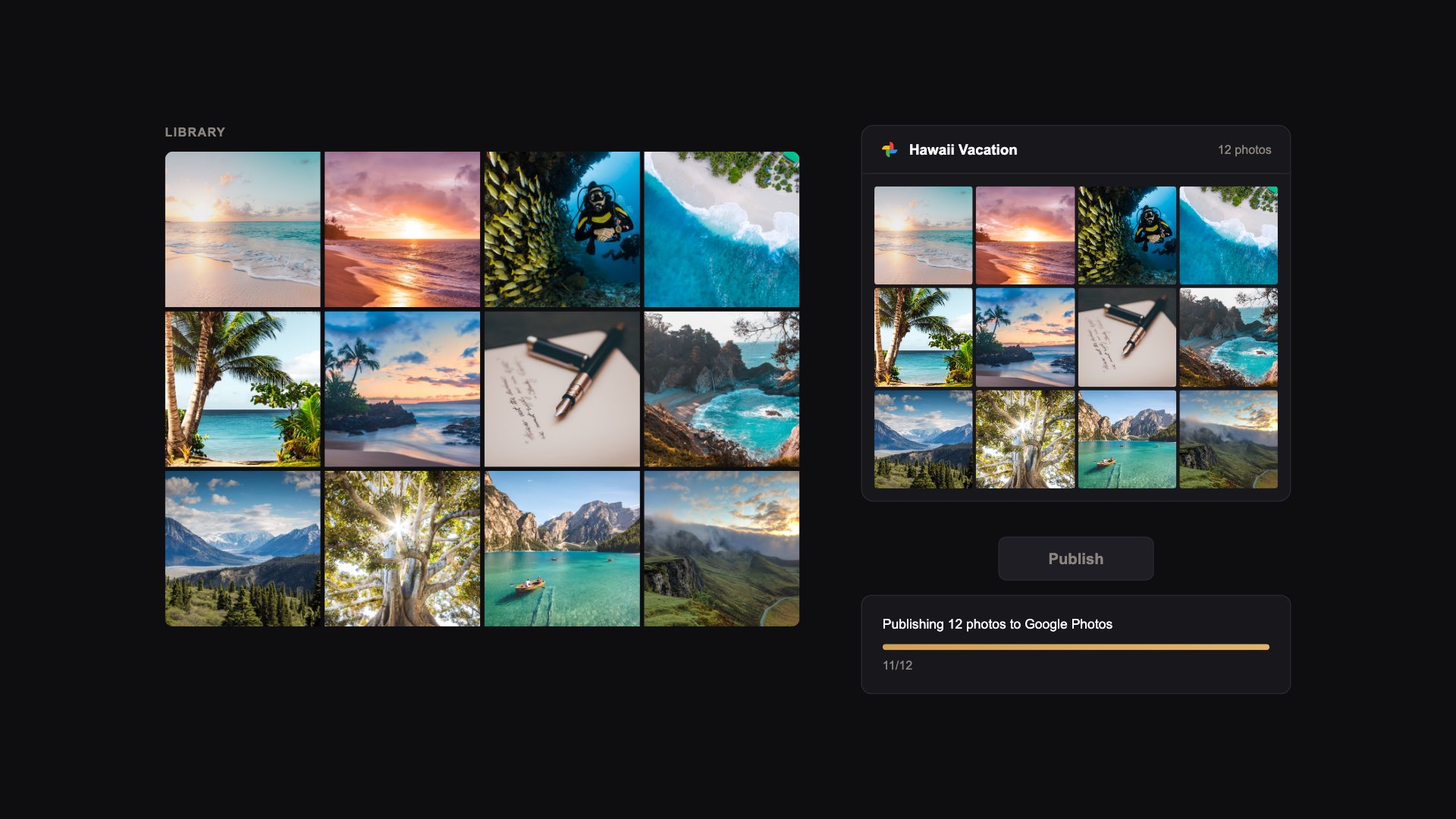
CLICK TO PLAY - 60 SECONDS, WITH SOUND, CAPTIONS ON SCREEN
Want to see every step on the real screen? Watch the full 12-minute walkthrough.
Read the transcript
The video is narrated, and the narration is also captioned on screen. This is the spoken text, with three lines corrected where the narration says more than the plugin does:
- Your best edits deserve better than a manual upload.
- Right now, getting them into Google Photos means export, upload, repeat.
- The Google Photos plugin connects Lightroom straight to your albums.
- Setup takes a minute. Paste your license key to activate - a one-time purchase, no subscription.
- Connect your Google account once. The plugin asks only to add photos to its own albums.
- Name a collection in Lightroom, and it becomes an album in Google Photos.
- Hit Publish, and your edited photos upload straight into the album, at the size you set in the publish settings.
- It's live in Google Photos - ready to share from any device.
- Change an edit later? Re-publish, and the new version replaces the old one in the album. The old copy waits in a To Delete album for you to delete.
- Captions go up with every photo, and your albums follow your collections. Everything you need, nothing you don't.
- Get the plugin, and your albums stay as polished as your edits.
FEATURES - WHAT DEVELOPS
Built for photographers who back up
through Google Photos.
Edit once. The album updates.
Tweak a photo in Lightroom, hit re-publish, and the new version replaces the old one in your Google Photos album - one current version per photo, however many times you edit it. The old copies wait together in a "To Delete" album for you to clear out.
Collections become albums.
Every Published Collection maps one-to-one to a Google Photos album. Organize once in Lightroom and the same structure shows up everywhere you view your photos.
Publish without leaving Lightroom.
No browser tab, no dragging files into a folder, no Drive-sync workaround. Drop photos into a Published Collection and hit Publish - that's the whole workflow.
Big files just work.
Resumable uploads handle anything Lightroom can export - full-resolution JPEGs, large TIFFs, even 100MP files. A spotty connection won't restart the whole upload from scratch.
Removed photos land softly.
Remove a photo from a Published Collection and it moves to a "To Delete" album in Google Photos. Review them in one place before you actually delete - no accidents, no surprises.
Works on Mac and Windows.
Built on Lightroom's native plugin SDK. The same install, the same workflow, the same behavior on both platforms. No separate downloads, no platform-specific quirks.
UNDER THE SAFELIGHT - WHY IT'S DIFFERENT
Publish once. Edit forever.
The usual way: export from Lightroom, open photos.google.com, drag the files into an album. Edit one of those photos a week later? Export again, hunt down the album, delete the old version, drag the new one in. Repeat for every tweak. Google Drive sync isn't a fix either - it dumps your originals into Drive without album structure, with no idea that the photo in your shared album is now out of date.
Google Photos Plugin handles the whole loop. Your Lightroom Collections become Google Photos albums automatically. Edit a photo in Lightroom and re-publish - the new version replaces the old one in the album, and the old copy is set aside in a "To Delete" album for you to delete. The plugin talks to Google directly using their official Photos API, so the only thing that ever sees your sign-in is Google itself.
HOW IT WORKS - THREE STEPS
Up and running
in minutes.
Buy
Purchase the plugin and receive your license key by email - usually within seconds.
Connect
Install the plugin in Lightroom, enter your license key, and sign in to Google - one consent screen and you're done.
Publish
Create a Published Collection, drop in your photos, and hit Publish. They appear in a matching Google Photos album.
CONTACT PRINTS - WHAT PEOPLE SAY
Quietly loved by
working photographers.
Finally a Lightroom-to-Google-Photos workflow that doesn't fight me. Edit, hit publish, the album updates. I'd been duct-taping shell scripts for a year - this replaces all of them.
I shoot 30k+ frames a year and the back-and-forth uploading was the worst part of my month. Smart re-publish alone saved a full afternoon last weekend - edits flow through automatically.
Bought it half-expecting jank, got a clean native plugin instead. Love that removed photos land in a "To Delete" album so I can review them in Google before they're actually gone - it saves me from my own mistakes, twice so far. Worth every penny.
FAQ - BEFORE YOU INSTALL
Frequently asked
questions.
Which Lightroom versions and operating systems are supported?
The plugin works with Adobe Lightroom Classic (the desktop version) on both macOS and Windows. It is not compatible with the cloud-based "Lightroom" (formerly Lightroom CC). Lightroom 6 and every Lightroom Classic release since are supported. New to plugins? Our roundup of the best Lightroom Classic plugins also walks through installing one.
Does it work with Lightroom 6 or Lightroom CC 2015?
Yes. The plugin is built for Lightroom 6 and newer, and Lightroom CC 2015 is Lightroom 6 under its subscription name - the same desktop app that became Lightroom Classic in 2017. Install it the same way (File > Plug-in Manager > Add) and sign in to Google as usual. If your browser shows a "can't connect" page after you click Allow, that is the normal hand-back to Lightroom; the guide's troubleshooting section has the 20-second manual step. The only Lightroom that cannot run plugins is the cloud-based Lightroom app, the one that syncs to your phone.
How is this different from uploading manually or using Google Drive sync?
Manual upload means exporting from Lightroom, opening photos.google.com in a browser, and dragging files into an album. Every edit means doing it again - export, find the album, delete the old version, drag in the new one. The albums and your Lightroom Collections drift apart over time. If you only need a one-off, here are all three ways to export from Lightroom to Google Photos, free routes included.
Google Drive sync isn't a fix - it dumps your original files into Drive without any album structure. Your shared albums stay frozen in time, and Drive has no idea the photo your family is looking at is now out of date.
This plugin plans the whole loop: Collections in Lightroom map to Google Photos albums automatically, and re-publish swaps the edited version into the album. You stay in Lightroom and the cloud catches up.
What happens to my existing Google Photos library?
Nothing changes. The plugin only manages photos and albums that it creates itself. It cannot read, modify, or delete any of your existing Google Photos content - that's enforced by Google, not just a plugin choice. Your existing library stays completely untouched.
Do uploads count against my Google account storage?
Yes - uploads count toward your Google account storage just like any other photo or video. The plugin doesn't compress or alter the original. Whatever Lightroom exports is what gets uploaded, and that's what counts against your quota. If you're tight on space, the Lightroom Publish dialog lets you set a quality and size limit on what's exported.
Can I import photos from Google Photos into Lightroom?
Not currently. Google retired the read scope on their Photos API in March 2025, which means no app can pull photos out of a user's library anymore. The plugin is publish-only: it pushes photos from Lightroom to Google Photos. We're tracking a future solution using Google's Picker flow, which lets users hand-pick photos to import. What that 2025 change means for every Lightroom Classic plugin for Google Photos is covered in our comparison.
If I edit a photo and re-publish, does it create a duplicate?
Not in the album. When you re-publish, the edited version replaces the old one in your Google Photos album - it is uploaded as a new photo and added at the end, because Google adds every upload last. The old copy is taken out of the album and moved to an album called To Delete (Lightroom Plugin). Google doesn't let apps delete photos, so you delete those old copies yourself, whenever you like.
Can I delete photos from Google Photos through the plugin?
The Google Photos API does not allow third-party apps to delete photos - that's a Google-side restriction. When you remove a photo from a Published Collection, the plugin moves it to a "To Delete" album in your Google Photos. You can review them all in one place before actually deleting from Google.
Does it edit my photos in Lightroom?
No. Nothing about your photos in Lightroom changes - not your edits, not your ratings, not your originals, not your catalog. The plugin reads what's in a Published Collection, exports a copy through Lightroom's normal export pipeline, and uploads that copy to Google. Your master files stay exactly where they are.
Is my Google sign-in safe?
Yes. The plugin uses Google's official sign-in flow. Your Google sign-in happens directly with Google in your browser - your password never touches the plugin, and never touches Lightroom Tools. The plugin only asks for the minimum permissions it needs to create albums and upload photos, and Google has verified those permissions in March 2026. See our Privacy Policy for full details.
Is this a subscription or a one-time purchase?
One-time purchase. Pay $19 once (until October 31 - the price rises to $39 on November 1) and your license never expires. No recurring fees, no usage limits.
How many computers can I use the plugin on?
Your license key can be activated on one computer at a time. If you switch machines, deactivate the old one from the plugin's Publish Service settings in Lightroom and activate on the new one. Takes a few seconds.
Can I get a refund?
Yes - 30-day money-back guarantee, no questions asked. If it is not right for you for any reason, email us within 30 days of purchase and we will refund you in full. We would rather you be happy than keep a sale. Full terms on the Terms of Service page.
Are updates free?
Updates to the version you buy are free - including compatibility fixes for new Lightroom Classic releases - for at least 12 months from purchase, and in practice until the next major version. Your license never expires. A new major version is a separate purchase, discounted for existing owners and free if you bought in the 90 days before it ships. Full policy on the Terms of Service page.
Still have a question? Email [email protected] or use the contact form - a real person reads every message and replies, usually within a day. Ask before you buy; we would rather answer than have you guess.
FROM THE JOURNAL
Deep dives for
Lightroom photographers.
THE PRINT - READY WHEN YOU ARE
Stop re-uploading
every time you edit.
Publish your Collections to Google Photos albums. Edit, re-publish, the album updates. Done in 1 click.
- One-time $19 until October 31 ($39 from November 1), unlimited photos - it pays for itself the first time you don't re-upload an album by hand
- 30-day money-back guarantee - no questions asked
- Direct upload to Google - we never see your photos
LIGHTROOM CLASSIC ON MACOS OR WINDOWS · FREE GOOGLE ACCOUNT