PRESS KIT - FOR REVIEWERS & JOURNALISTS
Lightroom Tools - Press Kit
Everything you need to cover us, on one page. Facts checked, assets downloadable, a real person one email away.
Email [email protected] and say which product - you'll get a full license key, no strings attached, usually within a day. Every product also carries a 30-day money-back guarantee, so recommending it carries no risk for your readers.
1. About Lightroom Tools
Lightroom Tools is a family of plugins for Adobe Lightroom Classic, built and supported by one developer, David Maizil. The through-line: everything runs on the photographer's own machine. Photos are not uploaded to our servers, there are no accounts, and the plugins keep working offline.
A growing set of plugins is live today ($19-$69, one-time purchase unless noted), and an iPhone companion app - Thumbs - is out now on the App Store. This page covers the three products most worth your readers' attention; details on the rest are one email away.
- Site: lightroom-tools.com
- Press contact: [email protected] - solo developer, personal responses
- Logo: 250px PNG · 120px PNG · SVG mark



2. Thumbs - the iPhone companion
THE NEWS HOOK - NEW PRODUCT, NEW CATEGORY
One-liner: Thumbs moves photo culling from the desk to the phone - send a shoot from Lightroom Classic, swipe it anywhere, and every pick, reject and star rating lands back on the right photos in the catalog.
Why it's a story: culling is the most hated hour of a photographer's week. Lightroom Classic's only built-in route to a phone is Adobe's cloud sync; Thumbs needs none of it. It sends small previews out, brings only decisions back, and works with no signal at all - the whole first pass of a shoot, done from a couch, a train, or an airplane seat.
Fact sheet
- What: free iPhone app + Lightroom Classic plugin
- Launch: September 2026, App Store
- Price: app is free; the free tier covers one shoot at a time, up to 100 photos. $29/year or $5/month lifts it to 5,000 photos per shoot, unlimited shoots
- Pairing: no account, no email - Lightroom shows a 6-character code, typed once on the phone
- Privacy: originals never leave the computer; only reduced previews travel, auto-deleted from the cloud after 90 days
- Offline: download a shoot over wifi, cull in airplane mode, decisions sync back later - verified on a real flight (300 frames down, 150 swiped at altitude)
- Requires: Lightroom Classic 6+ on macOS · iPhone, iOS 17+
Assets: product page at lightroom-tools.com/thumbs. 86-second narrated demo video · poster still. App Store screenshots are available on request.

3. Face Tagger
One-liner: face recognition for Lightroom Classic, running entirely on the photographer's own Mac - train it on two photos of a person and every other shot of them becomes a searchable Lightroom keyword.
Why readers care: Lightroom Classic's built-in People view slows down on large catalogs, needs a lot of manual confirmation, and keeps its groupings locked inside People view. Face Tagger turns the people in a catalog into real Lightroom keywords instead, and does it without sending a single photo to a server.
Fact sheet
- Price: $39, one-time
- Privacy: all recognition runs locally; works with the internet off after a one-time setup download
- Output: real Lightroom keywords - usable in Smart Collections, filters, search and exports
- Reads RAW (.ARW, .CR2/.CR3, .NEF, .RAF, .DNG) directly; tags people even when shot from behind
- Requires: Lightroom Classic 6+ · macOS on Apple Silicon (M1+)
Assets: 90-second narrated demo video · poster still · product page at lightroom-tools.com/face-tagger (includes a live in-browser demo of the real matcher).

4. Google Photos plugin
One-liner: publish photos from Lightroom Classic straight to Google Photos - a native Publish Service, so edits re-publish with one click and removed photos are tracked.
Why readers care: photographers who back up or share through Google Photos otherwise export to a folder and drag-upload every time. This is the missing bridge, and the longest-shipping product in the family - a safe recommendation.
Fact sheet
- Price: $19, one-time
- Native Publish Service: re-publish edited photos, track removals, organize into albums from inside Lightroom
- Privacy: photos go from the photographer's machine to their own Google account - nothing passes through our servers
- Requires: Lightroom Classic 6+ · macOS
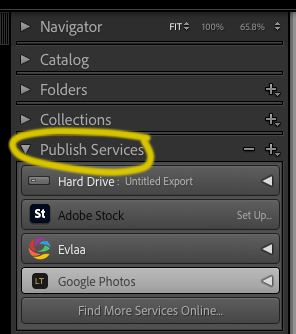
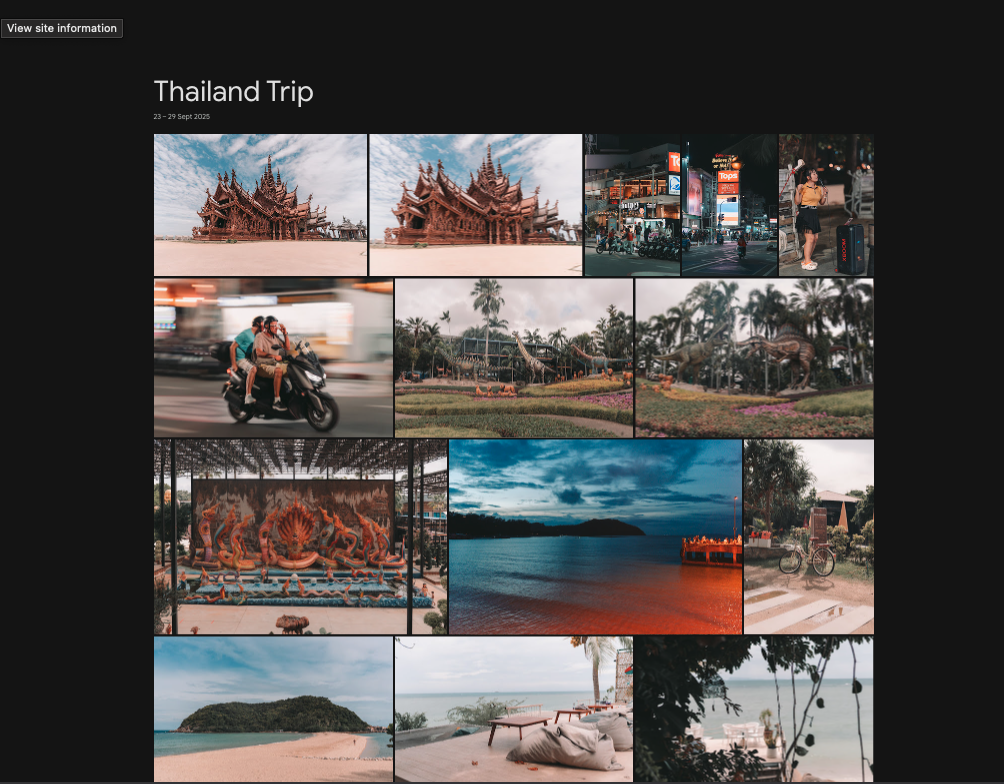
Assets: demo video · Publish Services panel · resulting Google Photos album · full step-by-step screenshot set on the guide page · product page at lightroom-tools.com/google-photos.
5. Boilerplate & fine print
Boilerplate: Lightroom Tools builds plugins for Adobe Lightroom Classic that run entirely on the photographer's own machine - no cloud upload, no accounts, no per-photo fees. Built and personally supported by one developer since 2025. lightroom-tools.com
- Lightroom Tools is an independent product, not affiliated with, endorsed by, or sponsored by Adobe Inc. or Google LLC.
- Every product carries a 30-day money-back guarantee.
- An affiliate program is planned - want an invite when it launches?
- Quotes, interviews, and additional screenshots: [email protected].